Home Blog Page 458

How To Turn Portrait Into Painting In Photoshop – A Phlearn Video Tutorial

0

Check out the full post at: http://phlearn.com/from-portrait-to-painting

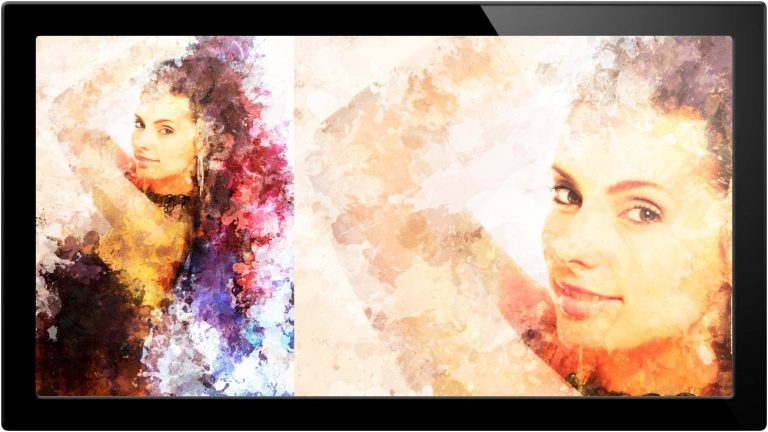
In today’s episode we turn a portrait into a wonderful work of art using Photoshop custom brushes, various filters, and mixing blending modes. The first and most important step is to start with a photograph you love because this tutorial is a bit more in-depth than a few in the past. The reason I decided to post this tutorial is because of a recent job I used these techniques for. It was a lot of work, a lot of fun, and a lot of phlearning. You can use this processing technique as we do in today’s episode, or apply it to your own images such as graphics and action shots. This can be used in a way to spice up a portrait that needs that extra kick.

We started by using filters such as cut-out to take away from the original to make it look more like a graphic image. Then we used a custom brush to create a splatter pattern, and using the colors within the image we created a pattern that can be incorporated over the portait to look like paint. Then we created a vignette using various blending modes to achieve the desired effect. .

Website: http://phlearn.com/
Facebook: https://www.facebook.com/Phlearn
Twitter: https://twitter.com/aknacer
Google+: https://plus.google.com/105267656376269695918/posts

For more tutorials and how to videos check out our extensive Photoshop and photography video channel: http://www.youtube.com/user/PhlearnLLC
We cover everything from Photoshop tutorials, photography tutorials, how to videos and more!
Lady Gaga Manipulation In Photoshop

0

Check out the full post at: http://phlearn.com/how-to-make-lady-gaga-born-this-way-horns

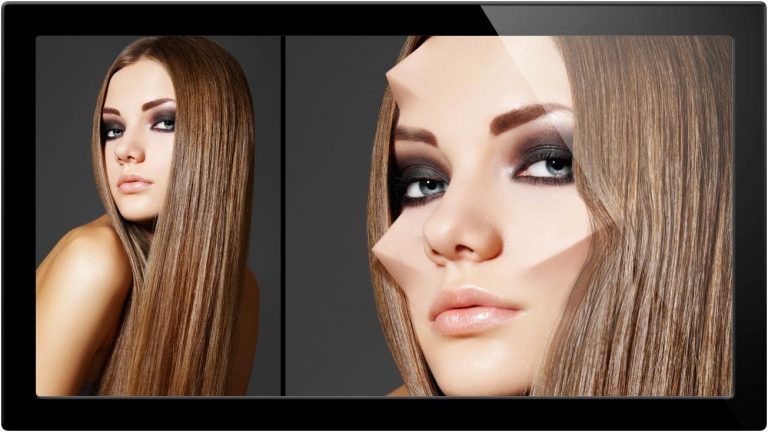
Welcome to Lady Gaga week! Starting things out with a bang we are going to go through how to create Lady Gaga style horns she has been recently sporting since Born This Way has been released.

We use the brush tool to sketch out what we want, following the natural structure of the face. Then use the ability to refine edges to make better and more realistic selections in photographs. We also add highlights as well as shadow to make the shape more three dimensional. And finally, we go through how to duplicate the same shape, warp it, and apply it to another area of the face. .

Website: http://phlearn.com/
Facebook: https://www.facebook.com/Phlearn
Twitter: https://twitter.com/aknacer
Google+: https://plus.google.com/105267656376269695918/posts

For more tutorials and how to videos check out our extensive Photoshop and photography video channel: http://www.youtube.com/user/PhlearnLLC
We cover everything from Photoshop tutorials, photography tutorials, how to videos and more!
How To Make Lady Gaga Bad Romance Eyes – A Phlearn Video Tutorial

0

Check out the full post at: http://phlearn.com/how-to-make-lady-gaga-bad-romance-eyes

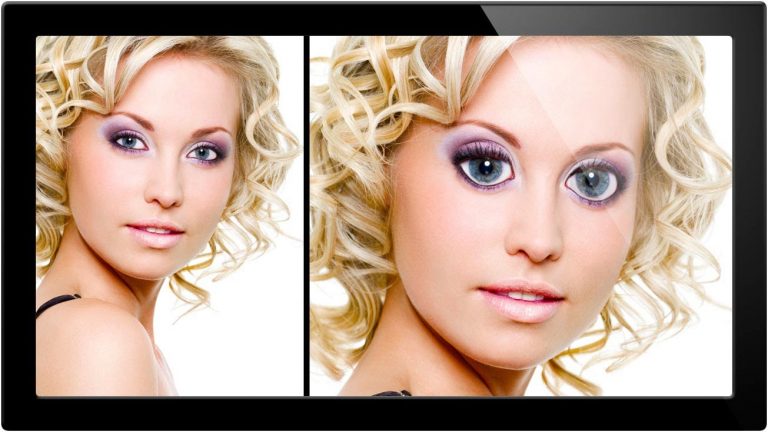
In today’s episode we cover how to create Lady Gaga’s googley-eyes from her Bad Romance video using a few Photoshop tricks.

In this tutorial we will cover how to enlarge your eyes. There are a couple of important things to keep in mind when doing this. The first is that you don’t want to distort the pupil because if done improperly it’s an unrealistic indicator. The second is to keep a natural proportion of the eyelids so the eyes don’t look out of place. Using liquify we shape the eyes correctly, and also enlarge the iris’ to the same degree using the transform dialog. .

Website: http://phlearn.com/
Facebook: https://www.facebook.com/Phlearn
Twitter: https://twitter.com/aknacer
Google+: https://plus.google.com/105267656376269695918/posts

For more tutorials and how to videos check out our extensive Photoshop and photography video channel: http://www.youtube.com/user/PhlearnLLC
We cover everything from Photoshop tutorials, photography tutorials, how to videos and more!
How To Make Lady Gaga Album Cover – A Phlearn Video Tutorial

0

Check out the full post at: http://phlearn.com/how-to-make-a-lady-gaga-album-cover

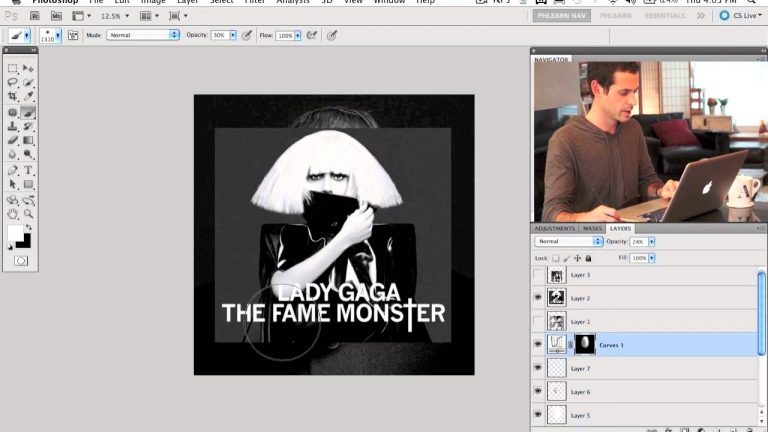
Today we decided to change it up a bit by doing an impromptu photo shoot. It’s important to try to keep the photography juices flowing so you’re excited to work in photoshop every day. We decided to attempt a shoot style like that of Lady Gaga’s single releases (all black & white with basic text placement).

In today’s tutorial we start by converting the image to black and white. The main goal here is to have the photograph be very high contrast and is achieved by making the brights as bright as they get and darks visa-versa. Next, we discuss using a square crop for album covers and some option to keep you from losing information when you crop such as combining multiple exposures. Using basic type tools we place text in the proper place, and to make it feel like Lady Gaga we then singled out one letter by elongating its line. .

Website: http://phlearn.com/
Facebook: https://www.facebook.com/Phlearn
Twitter: https://twitter.com/aknacer
Google+: https://plus.google.com/105267656376269695918/posts

For more tutorials and how to videos check out our extensive Photoshop and photography video channel: http://www.youtube.com/user/PhlearnLLC
We cover everything from Photoshop tutorials, photography tutorials, how to videos and more!
How To Make Lady Gaga Judas Makeup – A Phlearn Video Tutorial

0

Check out the full post at: http://phlearn.com/how-to-make-lady-gaga-judas-make-up

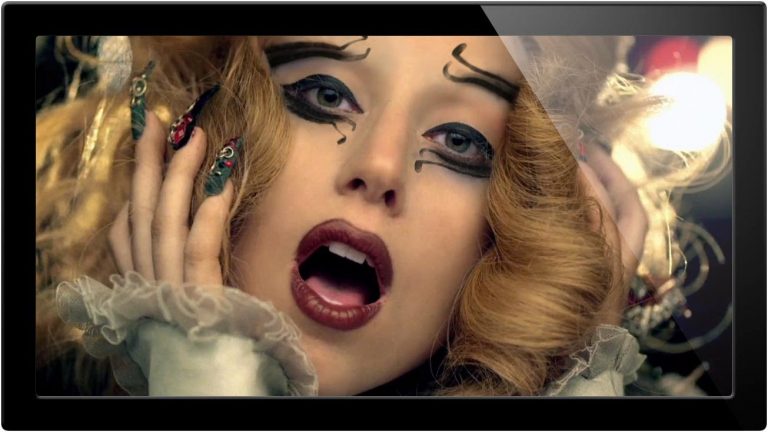
In today’s tutorial we take Lady Gaga’s make from Judas as a template to add into the photograph. Using photoshop we can easily add any type of thick eye liner and eye shadow, as well as use the same techniques when applying other make-up (lipstick, blush, etc.)

First, we begin with an image of Gaga that is stripped of the make-up itself (episode of that to come in the future). Now, using a blank canvas we find an image for reference, or you could even begin drawing your own eye liner. Then we move the layer onto a new canvas and begin modifying it to scale correctly and look more realistic. We can do this by scaling and adding edge modifications. After the make-up is added back into the picture we can then use blending modes to adjust accordingly and make a few more slight tweaks with that transform tool. It’s an effect that is both useful and simple to imply in many situations. .

Website: http://phlearn.com/
Facebook: https://www.facebook.com/Phlearn
Twitter: https://twitter.com/aknacer
Google+: https://plus.google.com/105267656376269695918/posts

For more tutorials and how to videos check out our extensive Photoshop and photography video channel: http://www.youtube.com/user/PhlearnLLC
We cover everything from Photoshop tutorials, photography tutorials, how to videos and more!

How To Add Something Into A Photo – A Phlearn Video Tutorial

0

Check out the full post at: http://phlearn.com/how-to-add-an-animal-into-the-foreground

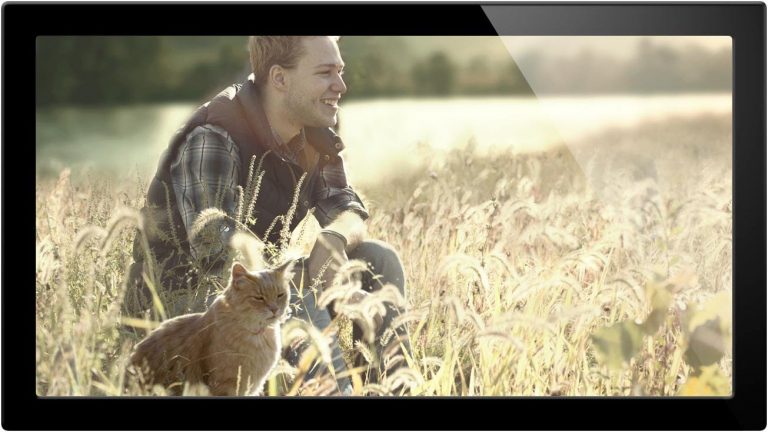
Y’all asked to add an animal into the image, and to make things even a bit more difficult we decided to add a cat into the foreground.

First, we found an image of a cat that works for the photograph. You can take your own image as long as you remember to light it all the same. We made a selection around the cat using the magic wand tool, and with the outline selected all we have to do is fill in the middle to make a quick, easy, and perfect selection. In order to make the cat seem natural we then use a combination of levels, hue, and saturation to make sure we get the color right. And we use a few special techniques to check the values of each. And finally a custom brush with the clone stamp tool to add more grass in front of the cat.

Hope you all enjoy and can put this all in to practice soon! .

Website: http://phlearn.com/
Facebook: https://www.facebook.com/Phlearn
Twitter: https://twitter.com/aknacer
Google+: https://plus.google.com/105267656376269695918/posts

For more tutorials and how to videos check out our extensive Photoshop and photography video channel: http://www.youtube.com/user/PhlearnLLC
We cover everything from Photoshop tutorials, photography tutorials, how to videos and more!
Caleb Spillyards Interview – A Phlearn Video Tutorial

0

Check out the full post at: http://phlearn.com/interview-with-caleb-spillyards

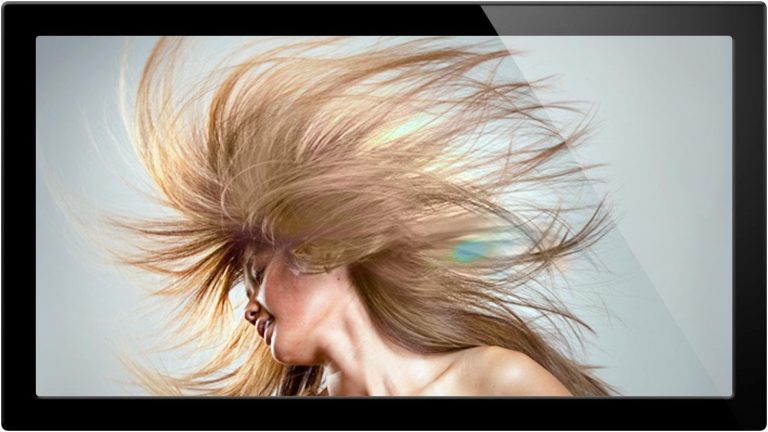
Today we take a break from the Halloween chaos to bring you the greatest hump day treat ever, Caleb Spillyards.

Caleb is an up and coming photographer who has his hand in about everything. He is an artist at heart like a lot of us are, and is finding his way through focusing on one thing and doing it well. In this interview we talk about expanding through social connections, business, art and more. .

Website: http://phlearn.com/
Facebook: https://www.facebook.com/Phlearn
Twitter: https://twitter.com/aknacer
Google+: https://plus.google.com/105267656376269695918/posts

For more tutorials and how to videos check out our extensive Photoshop and photography video channel: http://www.youtube.com/user/PhlearnLLC
We cover everything from Photoshop tutorials, photography tutorials, how to videos and more!

Finding A Focal Point In Image – A Phlearn Video Tutorial

0

Check out the full post at: http://phlearn.com/finding-a-focal-point-why-we-edit

Today we are going into the 2nd part of editing fundamentals -Finding a focal point, and why we edit in the first place. These are things not many people talk about, but they should be at the root of everything you do in Photoshop.

We go over various ways in which a viewer’s eyes will be attracted to a certain part of an image. These include Saturation, Difference between Tone, Focus, Sharpness, & Composition. The great news is that Photoshop gives you the tools necessary to change all of these things to help you get your point across. In the end you will want a clear idea of where the viewer should look at your image. This episode is all about helping you do that. .

Website: http://phlearn.com/
Facebook: https://www.facebook.com/Phlearn
Twitter: https://twitter.com/aknacer
Google+: https://plus.google.com/105267656376269695918/posts

For more tutorials and how to videos check out our extensive Photoshop and photography video channel: http://www.youtube.com/user/PhlearnLLC
We cover everything from Photoshop tutorials, photography tutorials, how to videos and more!
Photoshop Tricks And Tips – A Phlearn Video Tutorial

0

Check out the full post at: http://phlearn.com/pt-3-editing-tips-tricks

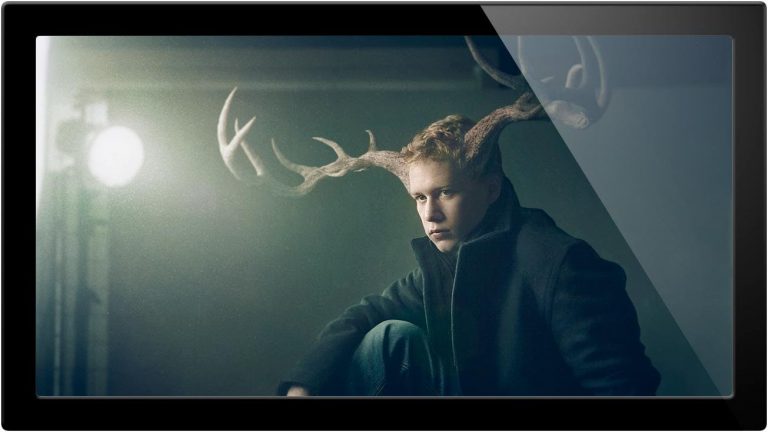
General TIPS to help

Don’t get bogged down with what you CAN do. Focus on what you WANT to do.

Don’t put yourself in a time crunch. Allow the photo to come to you. It is great to step away from your image. Take a few days to edit. You will see things new each time.

Keep notes on what works, so you can go back to that

Simplify the image as much as possible while still getting the idea across.

Try something CRAZY – you just might like it. – colors, jump out of your comfort zone and style, try adapting the style of others.
Composition – look for it before you start, change it if you need to.
Look at what other people are doing with their editing, see if you can break it down & copy

Try all the blending modes even if you think you know which one you want

Fix clipping and edit with levels, curves – generally: neutralize, then expand by 5
Watch your highlights and shadows,

View the “mask only” to make sure you’re only masking what you want
Circle what you want to fix on your photos

Have some fun! .

Website: http://phlearn.com/
Facebook: https://www.facebook.com/Phlearn
Twitter: https://twitter.com/aknacer
Google+: https://plus.google.com/105267656376269695918/posts

For more tutorials and how to videos check out our extensive Photoshop and photography video channel: http://www.youtube.com/user/PhlearnLLC
We cover everything from Photoshop tutorials, photography tutorials, how to videos and more!

How To Know When To Finish Editing Photo – A Phlearn Video Tutorial

0

Check out the full post at: http://phlearn.com/how-to-finish-an-edit

Today we cover why some things are best saved for the END of an edit.
Throughout my history of learning Photoshop and Photography, I have a tendency to rush things. With editing, this can really hurt good process. There are things that need to be done first and things that need to be done last in order for everything to come out right. Experience is the best teacher, and I am sharing mine. Doing things the wrong way around is like putting frosting on a cake before you put it in the oven. Not gonna work.

Here are a few things that are best saved for the end.
Sharpening – If done too early it can really mess up your image quality.
Coloring – Make sure your image looks good in black and white first
Adding Noise, Blurs, Other effects – you want these to hit everything equally
Textures – These work best when applied evenly to everything.

How do you know when you are done with a photo? Use the step away method 🙂 .

Website: http://phlearn.com/
Facebook: https://www.facebook.com/Phlearn
Twitter: https://twitter.com/aknacer
Google+: https://plus.google.com/105267656376269695918/posts

For more tutorials and how to videos check out our extensive Photoshop and photography video channel: http://www.youtube.com/user/PhlearnLLC
We cover everything from Photoshop tutorials, photography tutorials, how to videos and more!